jump to navigation

Archive for the ‘RSH9103QNB’ Category

Warning: G-Power is a time stealer

Sunday, March 7th, 2010

So today I finished up the 11th activity in RSH9103QNB and got ready for the 12th as outlined in the syllabus:

Consider your study, conduct a mock power analysis using G*Power. Include the results of your power analysis in a word document. Submit these results along with a brief paragraph, approximately 250 words, stating the role of a power analysis in your dissertation, and why you must include a power analysis in your paper.

Sounds pretty straight forward, but little did I know it would take me way too long to even get the program up and running and start working on the assignment. The syllabus directed me here and so I read up on G-Power. G-Power is a tool that a researcher can use to identify the sample size most appropriate for the study, i.e. one that provides enough of a sample, but not too much of a sample. The idea is to find at what level is the size meaningful.

Well, I downloaded G-Power 2 and then after installation a little note pops up and tells me that G-Power 2 cannot run on my Vista system…that is, after it went through even setting up some “missing files” to run the program. So I went back to the website and downloaded G-Power 3. This program also tells me that I am missing some files so I have to wait for those to download. Then the setup informs me that I have to reboot, then it finishes setup. Then I can’t find the program on my computer.

Five minutes later I find the program and run it. And I am not sure what I am supposed to do with it.

So I spend an hour looking up the two pdfs the syllabus gives me, plus reading the tutorials on the G-Power website, plus doing a Google search for any information that I can find about power and G-Power.

I end up spending way too much time just prepping for this activity. I haven’t even started writing yet. Of course, the activity is only 250 words or about a page, but I have to understand the program and G-Power before I can write even a word!

MS Word page numbering help

Sunday, February 28th, 2010

Someone shared a some information about page number formatting in MS Word with the nculearner forum. I took a look at the website and there are a number of helpful documents and tutorials available.

The page on page numbering has lots of helpful hints and tips! One of the documents is “Word’s numbering explained” (highly recommended reading) and “How to control page numbering in a Word document (super highly recommended reading). We students get so tied up in constructing and formatting our papers, that we often lose sight of CONTENT MANAGEMENT. Even my students at the University of Phoenix get nervous when those three little letters are mentioned: APA. I believe that we spend too much time focusing on formatting and not focusing on style and content, the true meat-and-potatoes of any paper.

My solution is pretty simple: learn all the tips and shortcuts you can about formatting so that you spend less time on these types of insipid activities. Every student-scholar should spend simply MINUTES on formatting and HOURS on research and writing. Unfortunately, it always seems it is the other way around. I receive more questions on formatting the Reference page in APA than I do on locating and using those same references!

Bookmark The Word MVP Site and others like it so that you can focus on what is fundamental to your assignments; research and ultimately….

LEARNING.

Bivariate statistics & the Little Nagging Voice

Sunday, February 21st, 2010

I finished up the 6th of 13 assignments in Activity 6 this evening. The title is “Applying and Interpreting Bivariate Statistics: Tests of Differences.” Activity 7 is “Applying and Interpreting Bivariate Statistics: Tests of Association.” Each of these are worth 10 points. I cannot upload #6 until Dr. M returns #5. I expect he will return it today because he has had #5 since 02/16 and today is the 21st. Mentors are to return assignments within 5 days.

Activity #6 is answer questions 2-8 and 14 on pp. 566-569 of the Zikmund text. These 8 questions are statistics-related, as have been most of the assignments in this class. I have gotten pretty good at using MS Word’s Microsoft Equation object to add the equations to my paper!

Stats is not my best subject, but so far in this class, I am doing fine. However, I feel like I work the problems very slowly and double-triple-quadruple check myself when I really do not need to. It’s odd how your psyche lies…”you can’t do these problems”…”you are going to miss this one”… “you are dumb in this subject”….I wish I could turn off that little nagging voice!

Snow in VA

Saturday, January 30th, 2010

Well, it’s been snowing since about midnight and we now have about 5″ on the ground.
Here’s a snow pic for you…Snow 01-30-10

I worked about 4 hours yesterday on an assignment in RSH9103QNB and am still not finished. Right now, I am taking a blogging break, then will fill up my trusty coffee cup and get started once more. I use my Saturdays to get some work done - especially in the mornings when it is very quiet. Husband and our two dogs are still in bed and I don’t have to use the ear plugs to keep myself focused on my school work. This week I teach a COM/285 class at the University of Phoenix, Richmond. My plans today are to work on the assignment mentioned above and post the syllabus for COM/285.

I have been writing this morning and just published an article on Associated Content:

Send Local Severe Weather Reports to the National Weather Service via Twitter

Be sure to read the article and tweet about your severe weather, too!

New APA 6.0 templates

Saturday, January 16th, 2010

I see that NCU has posted new APA 6.0 templates in the Dissertation Center. I see the Concept Paper, Dissertation Manuscript, Dissertation Proposal, and Topic Paper Templates. I haven’t had an opportunity to print these out, and will not until much later. It will be a while until I need those templates. NCU is requiring APA 6.0 for dissertations accepted after Jan 1st, 2010. I am trying to learn the revised APA guidelines, and still puzzle a bit over why some of the changes were made. When I received my first 6.0 manual, I read it through, but have not had a chance to do the same for the revised/replaced 6.0 (I have the corrected 2nd printing).

Today I have been working on RSH9103QNB-5, Applying Univariate Statistics. I had to review statistics a bit to answer some of the questions, and admit that it took me longer to work up this paper than I had thought it would. I’m all finished now, and plan to work on assignment 2 tomorrow. That is - either before or after husband and I go see AVATAR!

Statistics reviewed in RSH9103QNB

Sunday, January 10th, 2010

I am still avoiding turning in assignment 2 in RSH9103NB. This assignment is a first pass at my dissertation questionnaire design. I am still not 100% convinced that my ideas for a questionnaire will work - my biggest concern is the sample. I think it will be very difficult to pull the sample together. Essentially, I had thought to send out questionnaires, but after talking with several people, I have discovered that most of the time the questionnaires are not returned. The best way to do it (it seems) is through an internet survey. My second concern is the breadth of the study design. I am afraid that I need to actually broaden the topic so that the research is applicable to more than just a small group. My topic is very specific, so that if people do not respond to a survey, the design is shot.

So, I am continuing to work on assignments in RSH9103QNB without turning them in. NCU does not allow turning in assignments out of sequence so I have to turn in assignment 2 next. I am working on assignment 5 now, “Applying and Interpreting Univariate Statistics.”

Here are all the assignments, so that you can get an idea of the statistics reviewed in this course:

1: Considering Questionnaire Design
2: Hypothetical Questionnaire Design
3: Application of Editing and Coding Techniques
4: Application of Descriptive Statistics
5: Applying and Interpreting Univariate Statistics
6: Applying and Interpreting Bivariate Statistics
7: Applying and Interpreting Bivariate Measures of Association
8: Multivariate Data Analysis
9: Secure a Chair for Your Dissertation Committee
10: Probability and Non-probability Samples
11: Sampling Procedures
12: Power Analysis
13: Envisioned Research Plan

Clearly, assignments 4, 5, 6, 7, 8, and 10 are statistics reviews (you could consider 11 as well). So for all those who are thinking about this course but t-r-e-m-b-l-e at the thought of STATISTICS, make sure you hand onto your statistics books for review!

NCU Dissertation Sequence

Sunday, January 3rd, 2010

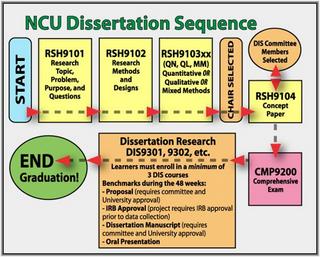
The course I am in right now is RSH9103QNB, Quantitative Methods. You can see from this Sequence chart that this is the third of four RSH (Research) classes at NCU. The student chooses either a quantitative, qualitative, or mixed methods class for this third course. In this course, not only do I complete assignments, I also secure a chair for my dissertation committee. My chair will be the instructor for the next RSH course, RSH9104B. During RSHI9104B, I select my committee members. After these four RSH courses, I take Comps (CMP9200), which is a course in which I will have to right four scholarly papers. Right now in our nculearner Yahoo group, we have been discussing some of the changes to the Comps. I had heard that NCU was going to move this course before RSH courses (which makes a lot of sense to me) but then I was told that they are considering it, but that has not been finalized. Once I complete CMP9200, I will be considered ABD (all but dissertation).

All of that seems so far away right now, but in reality, I will be at that point within the year!

NCU Dissertation Sequence

RSH9103QNB Quantitative Methods

Saturday, January 2nd, 2010

I turned in the first assignment today for RSH9103QNB, “Considering Questionnaire Design.” My mentor for this course is Dr M, and the course dates are Jan 1 through Mar 26. This first assignment was a book-question-and-answer set from Zikmund’s chapter 15.

The second assignment is “Hypothetical Questionnaire Design” in which I am to create a questionnaire based on my chosen dissertation topic. So I skipped this one (temporarily) and moved on to assignment 3, “Application of Editing and Coding Techniques.” This one is also a book-question-and-answer set, this time from Zikmund’s Chapter 19.

I won’t be able to turn in assignment 3 before doing and receiving back graded 1 and 2, but I am on a roll with those book questions. I want to re-research my topic some before I work on a survey for it.

I receive blog reader questions from time to time asking me how I set up for these book-question-and-answer sets. First, I type out every question in my paper so that when I refer back to the papers I know what the assignment was about. This has been very helpful as the assignments build on one another. It is simply of way of assisting with categorizing my responses. I use page break in MS Word between questions. By typing out the questions first, when I read I know what to focus on. Then, I read the entire chapter and any other links provided in the syllabus.

Most of the time, the questions are little essays, about a page, maybe two pages in length. I always use a lot of references, and follow APA rules, including voice. Of the 13 assignments in this class, 9 are book-question-and-answer type.